TrueRTA
Revision History |
5May14
TrueRTA Version 3.5.6 is releasedChanges:
- Added a preference setting for selecting
inter-channel sample offset. This helps to achieve precision nulling
with a wider variety of hardware.
ALL TrueRTA V3 users can
download this FREE UPGRADE! |
27Jun13
TrueRTA Version 3.5.5 is releasedChanges:
- Improved behavior of input edit fields.
- Generator frequency is saved with up to two decimal
digits of resolution
|
7Jan13
TrueRTA Version 3.5.4 is releasedChanges:
- Fixed a bug related to Level 3 Quick Sweep
|
6Dec12
TrueRTA Version 3.5.3 is releasedChanges:
- Improved the Audio Selection Dialog to display many
more audio devices
- Improved the oscilloscope triggering and sweep
behavior
- Numerous other small improvements
|
20Jun11
TrueRTA Version 3.5.2 is releasedChanges:
- Fixed a bug where the line in calibration could
become corrupt between launches
|
25May11
TrueRTA Version 3.5.1 is releasedChanges:
- The application now remembers audio
device selections between launches
- Revised the Audio Device Selection dialog to shift
output devices to the top of the list
- Revised to maintain separate calibration settings
from previous versions
- Adjusted default calibration for the
Behringer UCA202 USB Audio Interface
- Other small bug fixes and improvements
|
31May10
TrueRTA Version 3.5.0 is releasedChanges:
- Fully Compatible With Windows 7
(both 32 and 64 bit editions)
- Added a new Audio Device Selection
dialog for selecting input and output devices from within the
application.
- Quick Sweep was improved to operate
at any signal level
- Expanded User's Guide
- Revised default calibration for the
Behringer UCA202 USB Audio Interface
- Numerous small bug fixes and improvements
|
24Nov08
TrueRTA Version 3.4.1 is releasedChanges:
- Fixed a bug where V3.4.0 lost the
project notes of older files.
- This was the last version that ran
under Windows versions prior to Windows XP.
Download TrueRTA v3.4.1
|
29Oct08
TrueRTA Version 3.4.0 is releasedChanges:
- The internal data structure was widely revised and simplified with the result that the analyzer now runs more efficiently with significantly reduced CPU usage.
- The precision of all utility functions is improved with the new structure. The smoothing utility now operates with essentially no perceived delay'even for the broadest smoothing operations. The reduced processing time allowed the upper limit of the smoothing range to be increased from 1 octave to 5 octaves.
- The accuracy for repeated data export/import is now excellent.
- Further benefits for the revision include greatly reduced file size and faster file operations. Note that project files saved with previous versions of TrueRTA are forward compatible with the new version. However, files saved with the new version are not backward compatible with previous versions.
- The Peak Hold bar display mode was revised to also show the live data within the peak.
- A Trigger Level Control and selection for Automatic Triggering were added at the Oscilloscope Tool Bar. Scope triggering is now much like that of a bench-top scope. Scope trace printing was changed so that traces are not printed outside the scope area.
- The Oscilloscope display can now be scrolled horizontally using Alt+Right and Alt+Left.
A preference selection was added to choose DC offset removal at the oscilloscope. The oscilloscope now uses separate DC offset removal for each of the two channels.
- A preference selection was added to allow the scope trace to be viewed as isolated data points rather than line-connected points. This provides a more intuitive view of higher frequency waveforms where line-connected points are not representative of the true analog waveform.
- The 'Black' color scheme was revised to provide more vivid colors but with reduced plot grid brightness.
- The Generator Dialog Bar's tab order was corrected.
- Many other small improvements were also made.
|
3Dec07
TrueRTA Version 3.3.4 is releasedChanges:
- The on screen meter display readings
(dBu, dB SPL and crest factor) are now saved with each memory.
- SPL Measurements are now portable
between different PCs.
- The maximum number of imported data
points has been increased from 850 to 5000.
|
12Oct07
TrueRTA Version 3.3.3 is releasedChanges:
- The Help System is now fully VISTA
compatible.
- The new software installer is more
compact and is compatible with a broader range of Windows versions.
|
27Nov06
TrueRTA Version 3.3.2 is releasedChanges:
- Fixed a bug in the sum and difference
utilities
|
4Aug06
TrueRTA Version 3.3.1 is releasedChanges:
- Both Memory 1 and 2 are now drawn
while the analyzer runs to allow upper and lower limits to be
displayed while data is collected
- Fixed a problem where the scope trace
was not seen after Quick Sweep
|
12Jul06
TrueRTA Version 3.3.0 is releasedChanges:
- Added support for House Curves
including SMPTE X-Curves
- Fixed a problem with peak hold
- Added a preference to enable/disable
Automatic Notes
- Increased the Notes area from 2 lines
to 5 lines of text
|
20May05
TrueRTA Version 3.2.0 is released
Changes:
- Added new generator waveforms: square,
triangle, saw tooth and impulse
- Added the capability to adjust the
square wave duty cycle
- Expanded metering to include dBu peak
numeric display
- Increased metering display from 4
digits to 5 digits precision
|
10Sep04
TrueRTA Version 3.1.1 is released
Changes:
- Fixed a bug where averaging required
that Memory 1 be used.
- Fixed a bug where the dB boxes did not
update completely when a project file was loaded.
|
26Jun04
TrueRTA Version 3.1.0 is released
Changes:
-
TrueRTA now saves and loads Single
Memory Files (.rt1 file type) to facilitate creating custom reports
with mixed data from more than one project file.
-
Project files now save and load the
complete application setup so that 'test setup' files can be saved and
when loaded they completely restore the test setup in addition to the
saved data. Saved settings include dB and frequency limits, the Mic
calibration file, window size and position'over application 50
settings in all. Old file types can still be opened but will be saved
in the new file format.
-
Now exports the full frequency range of
data rather than just the selected range.
-
Revised and updated the Help Topics.
-
Added custom file icons and the ability
to open a project file by either double-clicking the icon, or dragging
the icon and dropping it on the application window.
-
Fixed a bug where the utilities could
give bogus results if the FFT sizes or input sampling frequencies of
the data were not matched.
-
Fixed a bug where importing data breaks
Mic Cal interpolation.
-
Fixed a bug where exported data was not
calibrated for all sampling frequencies.
|
19Jan04
TrueRTA Version 3.0.3 is released
Changes:
- Fixed a bug where a bar was drawn at
the left edge at startup
|
16Jan04
TrueRTA Version 3.0.2 is released
Changes:
- Improved the performance of
Quick Sweep
- Fix a bug that caused a crash on exit
if running
- Fix a bug in the smoothing utility
- Fix a bug related to importing data in
the SPL mode
- Fix calibration error related to input
F(s)
- Improved computational efficiency at
the plotter
- Change default to analyzer not running
at startup
- Revise the Black and Dark Gray color
schemes for less contrast
|
25Oct03
TrueRTA Version 3.0.1 is released
Changes:
- The smoothing function was revised.
- The installation folder was changed to
TrueRTA_3
|
16Oct03
TrueRTA Version 3.0.0 is released
Changes:
This is a major new release with many new
features including:
- Project file saves measurements and
notes
- Memory Bar with 20 memories
- Greatly expanded and improved printing
- Data Import with interpolation
- Notes Bar with Auto Notes
- SPL Scale and SPL Calibration
- Post Processing Utilities
- Cursor Readout
- Sound System Cal and Mic Cal now
export
- Max Sampling Frequency increased to 96
kHz
- Now saves one scope trace with the
Project File
- New Preferences Settings
|
11Feb03
TrueRTA Version 2.0.3 is released
Changes:
Reviewed and revised buffer
sizes and thread priorities to level CPU usage.
Faster operation at low sampling frequencies improves very low frequency
work.
Corrected dB references to consistently refer only to "dBu"
(.775vrms).
Improved scope stability and reduced scope's CPU usage.
Revised the CPU usage warning dialog that would sometimes not draw right
away.
Click here to download the
final version 2 release: Download
Version 2.0.3
|
30Oct02
TrueRTA Version 2.0.2 is released
Changes:
Improved stability of audio
input/output operations.
Disabled certain commands while Quick Sweep is in progress.
|
17Jun02
TrueRTA Version 2.0.1 is released
Changes:
Revised Quick Sweep for less
overhead so it runs better on slower PCs.
Added a button to select default calibration at the Line In/Out
calibration dialogs.
Now does a second sweep after sound card calibration to show corrected
response.
Fixed a number of small bugs.
|
26May02
TrueRTA Version 2.0.0 is released
New features include a "Quick
Sweep" feature that automatically generates a digital sweep and
acquires the frequency response with a single click. There is a new
calibration procedure that removes your sound card's response from
your measurements. There is also a new "Relative Mode" feature
that allows you to use any response curve as the reference for
subsequent measurements. The line mode plots now have a smoother look
due to a change in how they are plotted. The interface has been largely
redesigned. You can now export response data.
|
25Jan02
TrueRTA Version 1.0.0 is released
The initial release of TrueRTA.
|
|
TrueRTA
Troubleshooting: |
|
Here are the most commonly
reported problems along with suggested solutions. Also see the FAQ.
|
My Registration Code Does Not
Work:
Your
registration information is not entered correctly/completely. It is always
best to directly copy the information from your registration email and
then paste it into User Registration dialog box in TrueRTA. Manual entry
tends to be error prone.
Your personal information (Name, address, etc.) is
used to generate the registration code. Whe the application starts
your user information is compared to the registration code to establish
the level of operation. If the user information does not precisely match
the code then the application only runs at Level 1. So if you ever need to
add/change a title or change your phone number
you will have to have a new code generated (here)
from your changed personal information.
Below is a typical User Registration entry. If this user happend to enter
his title as "owner" instead of "Owner" the code would not work because
the user information is now different from the information used to
generate the code. Every letter, space and comma must exactly match the
registration information in your registration email. Make sure to back up
your registration email so that you can reactivate the software in the
future on a new PC or following a disc crash.
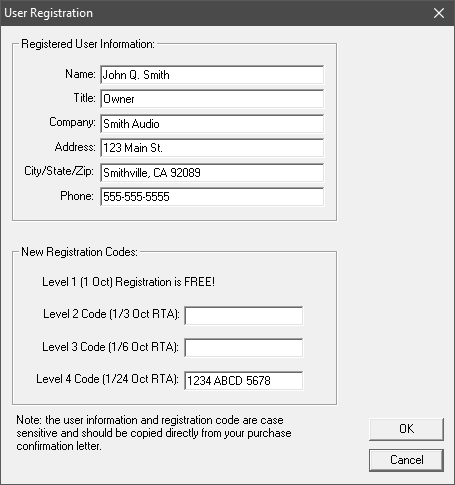
Simple mistakes that will cause the above code to not work:
-
The user failed to enter the period after his middle
initial. (use the exact punctuation seen in
the registration email)
-
The "O" in "Owner" was entered in lower case.
(all text is case sensitive)
-
"123 Main St." was entered as "123 Main Street".
(Street should be St. and breaks the code)
-
"Smithville" is mistakenly spelled
"Smithvile". (even the smallest spelling error
will break the code)
-
We gave you a code that does not work.
(this has happened ony once ever!)
-
There are three hidden spaces following the
title "Owner " instead of "Owner".
(hidden spaces will break the code)
-
The letter "o" or "O" has been entered in the
code instead of the number "0" (zero). (The
registration code may include zeros but never the letter "O")
If you are having trouble entering your registration information we
strongly recommend copying and pasting the information from the original
registration email sent from True Audio.
|
After
clicking OK at the calibration dialog I can no longer see any response:
Your TrueRTA is probably miscalibrated. The quick fix is to go to the Audio I/O menu and open the Line Out and Line In Calibration
dialogs. At each of these dialogs click on the button labeled
"Restore Default Calibration." That should fix the problem.
|
I seem to be getting feedback of some
sort:
You may have the Windows Playback mixer set
wrong. Open the Windows Playback mixer and make sure that you DO NOT have
Line-In selected and that the Line-In fader is at minimum. Only the WAVE
signal should be selected at the Play mixer. (a hard wired feedback loop
can be created if you are in loopback configuration with the Line-In
signal is selected and fader raised...not good) This
can cause a wide range of strange problems.
|
Send us mail detailing any
other questions or problems: support@trueaudio.com
|